

CrossOver for Mac CD Key (Lifetime / 1 Device)
CrossOver for Mac CD Key (Lifetime / 1 Device)
Couldn't load pickup availability

CrossOver for Mac CD Key (Lifetime / 1 Device)
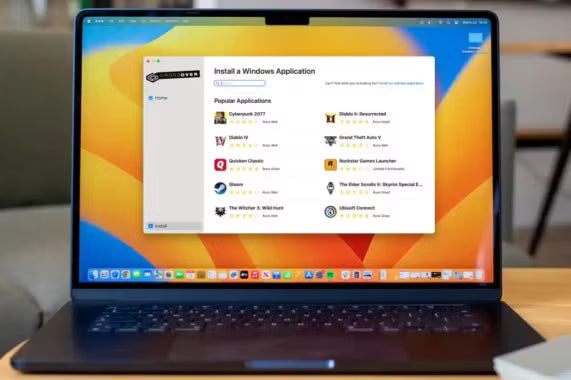
Run Windows apps on your Mac—no extra hardware, no dual-boot. The CrossOver for Mac CD Key (Lifetime / 1 Device) unlocks a polished compatibility layer that launches many PC games and productivity tools right from macOS. Own it once and keep your favorite software within a click.
Key Features
-
Install thousands of supported Windows apps and games with guided bottle templates
-
Launch programs directly from the Dock—no virtual machines or disk-hungry images
-
Optimize performance with DXVK, controller support, and game-focused tweaks
-
Share files, printers, and clipboard seamlessly between Windows apps and your Mac
-
Update easily with ongoing compatibility improvements included in your lifetime license
Story and Atmosphere
CrossOver feels like a bridge that disappears as soon as you cross it. You click an installer, pick a bottle, and your program appears like a native app—menus, shortcuts, and files right where you expect them. It’s an epic adventure for productivity and play: launch work tools at lunch, a quick session of a classic title after hours, and keep everything in one tidy setup. Not open-world exploration, but it opens doors that used to stay closed.
Technical Specs & System Requirements
Available Platforms
Mac
Minimum Requirements
-
CPU: Modern dual-core processor
-
GPU: Integrated graphics with Metal support
-
RAM: 8 GB
-
Storage: 2–4 GB for app and bottles (more for games)
-
Internet: Required for activation and bottle dependencies
Recommended Requirements
-
CPU: Recent quad-core Apple silicon or Intel
-
GPU: Integrated or discrete graphics with strong Metal performance
-
RAM: 16 GB+
-
Storage: SSD with 20 GB+ free for apps/games
-
Internet: Stable broadband for downloads and updates
| Spec | Minimum | Recommended |
|---|---|---|
| CPU | Modern dual-core | Recent quad-core (Apple silicon or Intel) |
| GPU | Integrated (Metal support) | Integrated/discrete with strong Metal performance |
| RAM | 8 GB | 16 GB+ |
| Storage | 2–4 GB + app data | SSD, 20 GB+ free for apps/games |
| Internet | Required (activation/dependencies) | Stable broadband |
Reviews & Testimonials
“Installed my must-have Windows tools in minutes—no VM, no fuss.” — ★★★★☆ Creative Pro
“Great frame pacing on classic games; Dock launch is a joy.” — ★★★★★ Mac Gamer
“Bottle templates and quick updates keep compatibility solid.” — ★★★★☆ IT Coordinator
Activation Guide (Mac)
Download software here: https://www.codeweavers.com/crossover/download-now, then install it.
Open CrossOver and activate your key inside the software after installation.
Buy Now — get your CrossOver for Mac CD Key (Lifetime / 1 Device) and run Windows apps and games on your Mac with a clean, native feel.